
Postproxy 🖤 Claude Code
Why we built an MCP server for Postproxy, and why publishing shouldn’t require leaving your flow.
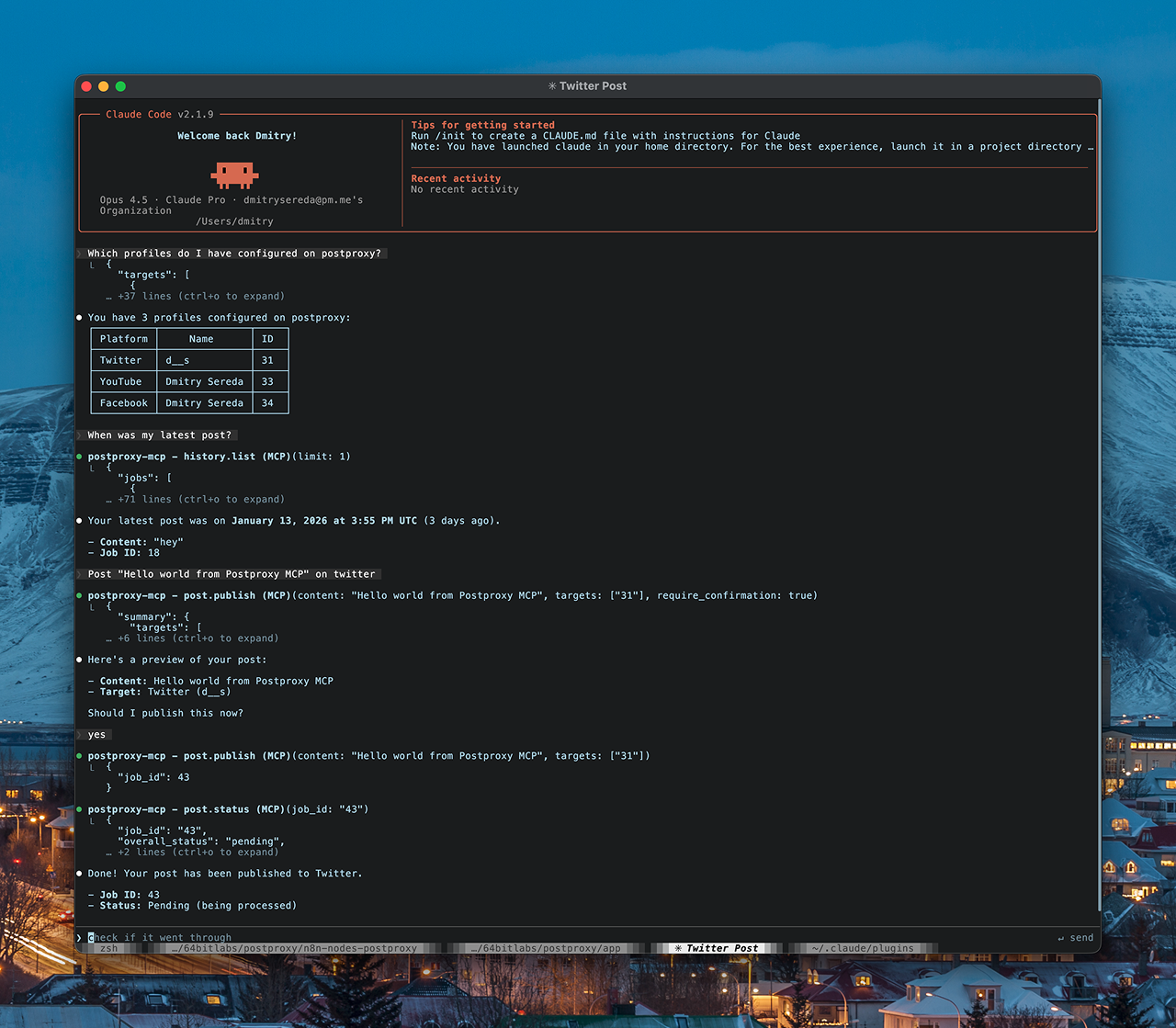
The moment we stopped switching tabs
At some point, we noticed a pattern in our own work.
We were already spending hours in the terminal. Not just coding, but thinking, planning, checking, asking questions, writing small bits of text, running experiments. With Claude Code, the terminal had quietly become a workspace, not just an interface.
And yet, publishing still lived somewhere else.
If we wanted to post something, we had to leave the flow. Open a browser. Switch context. Paste text. Click buttons. Then come back and hope nothing broke in the meantime.
That gap started to feel unnecessary.
Why publishing doesn’t belong to a UI
Most publishing tools assume a person sitting in front of a screen, making deliberate, visible actions. That model works for manual workflows, but it doesn’t fit how many people actually work today.
When you are already using Claude in the terminal to think, plan, summarize, draft, or decide, publishing is no longer a separate activity. It is just another step in the same flow.
If content can be produced there, it should be possible to publish it there as well.
Enter MCP
Model Context Protocol gave us a clean way to expose Postproxy as something Claude can use directly. Not through a UI, and not through copy-paste, but as a first-class capability inside the terminal.
We built an MCP server so Claude Code can:
- discover which social profiles are available
- check recent publishing history
- prepare a post and show a preview
- publish it, with explicit confirmation when needed
- observe what happened after the publish request
All without leaving the terminal.
Not because it looks cool, but because it matches how people already work.
This is not about “coding”
It would be easy to frame this as a developer feature. Terminal. MCP. Claude Code. Done.
But that misses the point.
Many people use Claude in the terminal without writing production code. They use it for productivity. For thinking through ideas. For drafting text. For checking status. For small operational tasks that don’t justify opening a full tool.
For those workflows, publishing is not a developer action. It is an outcome.
Being able to ask “when was my last post?” or say “publish this” in the same place where the content was created changes how publishing feels. It becomes quieter. More natural. Less performative.
Publishing as a conversational action
Using Postproxy through MCP turns publishing into a conversation instead of a procedure.
You can see what will be published. Confirm it. Ask for status later. Notice if something is still processing. All in the same environment where the decision was made.
That matters, especially for automated or semi-automated work. When systems and humans collaborate, the boundary should be explicit but lightweight. MCP gives us exactly that.
Why we built this now
We didn’t build the MCP server because it was trendy. We built it because it exposed an important question.
If publishing is truly an execution step, why does it require a separate tool at all?
The terminal already holds context. Claude already understands intent. Postproxy already knows how to execute reliably across platforms. MCP connects those pieces without inventing a new interface.
That felt like the right direction.
Publishing without breaking flow
This is not about replacing UIs. Some workflows will always need them.
It is about removing unnecessary friction for the cases that don’t.
If you are already working in the terminal, publishing should not force you to leave it. If you are already thinking with Claude, publishing should not require a context switch.
The MCP server is a small step in that direction. It lets systems and people finish what they started, without staring at another screen.
That is the kind of automation we care about.